How to Hide Cash on Delivery Above a Cart Subtotal in WooCommerce
Cash on Delivery (COD) can be useful for some orders while creating extra risk or handling work for larger baskets. MegalogicStudio Checkout Rule Guard can hide one configured payment method when a subtotal rule matches. It does not process payments or change gateway settings.
Create the COD rule
- Install and activate WooCommerce and MegalogicStudio Checkout Rule Guard.
- In WordPress admin, open WooCommerce → Checkout Rules.
- Under Start from a free template, choose Hide Cash on Delivery above an amount.
- Keep Method type set to Payment method and select your store's configured Cash on delivery method under Method to hide.
- Set Condition to Cart subtotal, Operator to is greater than, then enter the threshold in your store currency.
- Give the rule a clear name, leave Enable this rule checked, and choose Save rule.
- Use Preview rules with a subtotal below, equal to, and above the threshold. Then test a real checkout flow on a staging site.
For a threshold of 100, the current “is greater than” condition does not match at exactly 100; it matches above 100. The rule uses WooCommerce's product subtotal before discounts, excluding tax, shipping, and fees. A coupon may lower the amount due without changing the subtotal used by the rule.
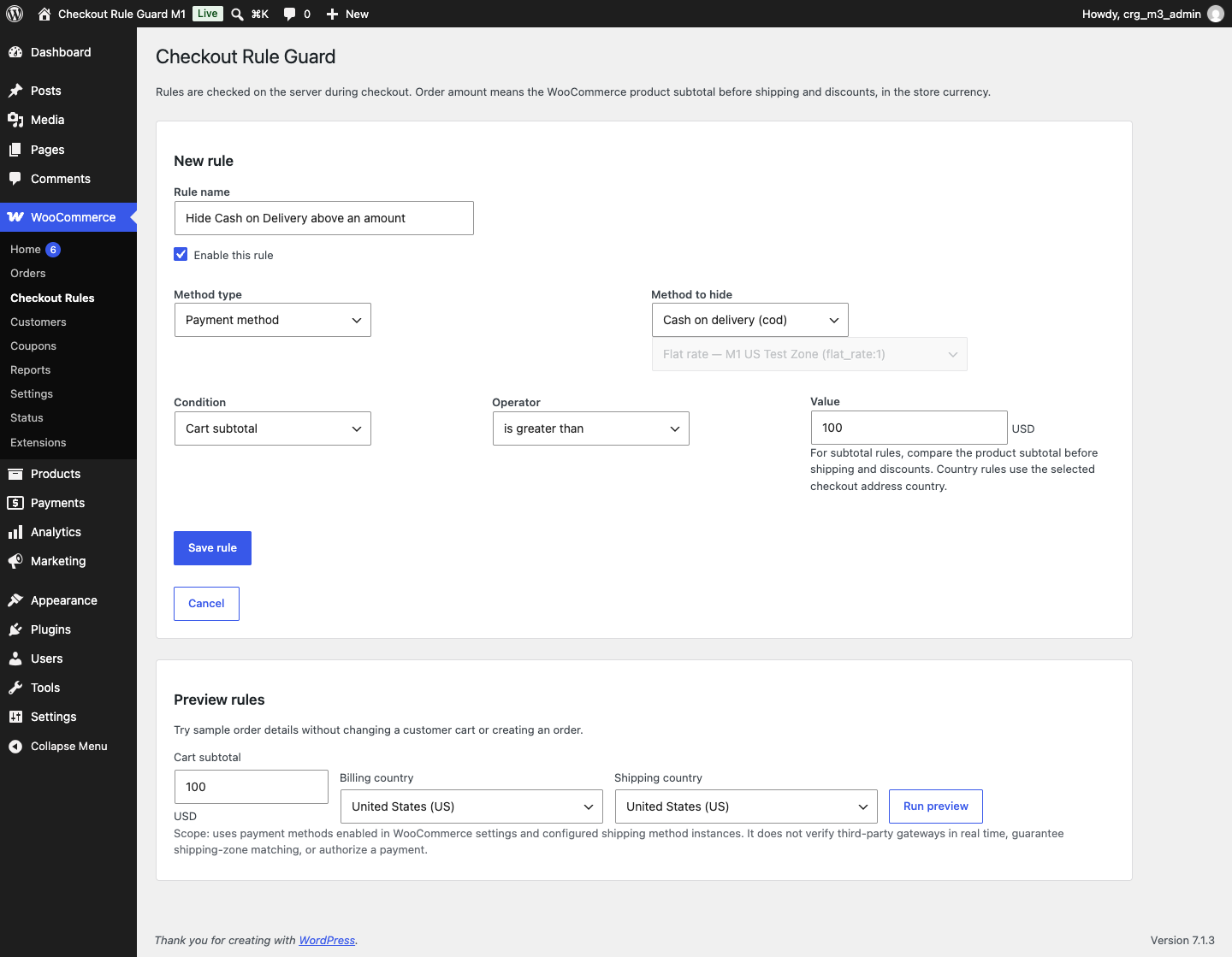
The preview helps you inspect saved rules, but it cannot query a third-party gateway's live availability. Before enabling the rule on a live store, confirm that another suitable payment method is available and test the complete checkout on staging.
Availability: Available on WordPress.org: MegalogicStudio Checkout Rule Guard.
Test scope: Locally tested with WordPress 7.1.3, WooCommerce 11.2.1, Classic Checkout, and Checkout Blocks. Other versions, themes, and third-party gateways are not verified.